
Packman lässt sich anlegen mit
Angezeigt wird dann
Soweit, so gut. Wenn ich dann in Myrlyn mir die Repos ansehen will, kommt das:
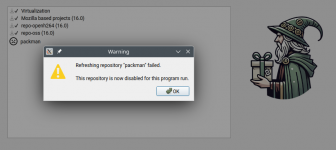
Wo habe ich etwas falsch gemacht? Die URL von packman habe ich geprüft. Kann Myrlyn das Repo nicht lesen?
Code:
sudo zypper ar -gf http://gwdg.de/pub/linux/misc/packman/suse/opneSUSE_Leap_16.0/ packman.repo
Code:
ralf@AZ-Desktop:~> sudo zypper repos -d
[sudo] Passwort für ralf:
#  | Alias                       | Name                          | Enabled | GPG Check | Refresh | Keep | Priority | Type   | URI                                                                                          | Service
---+-----------------------------+-------------------------------+---------+-----------+---------+------+----------+--------+----------------------------------------------------------------------------------------------+---------
 1 | Leap                        | Leap 16.0                     | Nein    | ----      | ----    | -    |   99     | rpm-md | hd:/install?device=/dev/disk/by-id/usb-Corsair_Voyager_GT_3.0_13390000000097771027-0:0-part2 |
 2 | Virtualization              | Virtualization                | Ja      | (r ) Ja   | Ja      | -    |  120     | rpm-md | https://download.opensuse.org/repositories/Virtualization/16.0/                              |
 3 | mozilla                     | Mozilla based projects (16.0) | Ja      | (r ) Ja   | Ja      | -    |   99     | rpm-md | https://download.opensuse.org/repositories/mozilla/16.0/                                     |
 4 | openSUSE:repo-non-oss       | repo-non-oss (16.0)           | Nein    | ----      | ----    | -    |   99     | N/A    | http://cdn.opensuse.org/distribution/leap/16.0/repo/non-oss/x86_64                           | openSUSE
 5 | openSUSE:repo-non-oss-debug | repo-non-oss-debug (16.0)     | Nein    | ----      | ----    | -    |   99     | N/A    | http://cdn.opensuse.org/debug/distribution/leap/16.0/repo/non-oss/x86_64                     | openSUSE
 6 | openSUSE:repo-openh264      | repo-openh264 (16.0)          | Ja      | (r ) Ja   | Ja      | -    |   99     | rpm-md | http://codecs.opensuse.org/openh264/openSUSE_Leap_16                                         | openSUSE
 7 | openSUSE:repo-oss           | repo-oss (16.0)               | Ja      | (r ) Ja   | Ja      | -    |   99     | rpm-md | http://cdn.opensuse.org/distribution/leap/16.0/repo/oss/x86_64                               | openSUSE
 8 | openSUSE:repo-oss-debug     | repo-oss-debug (16.0)         | Nein    | ----      | ----    | -    |   99     | N/A    | http://cdn.opensuse.org/debug/distribution/leap/16.0/repo/oss/x86_64                         | openSUSE
 9 | openSUSE:repo-oss-source    | repo-oss-source (16.0)        | Nein    | ----      | ----    | -    |   99     | N/A    | http://cdn.opensuse.org/source/distribution/leap/16.0/repo/oss                               | openSUSE
10 | packman.repo                | packman                       | Ja      | ( p) Ja   | Ja      | -    |   99     | N/A    | http://gwdg.de/pub/linux/misc/packman/suse/openSUSE_Leap_16.0/                               |
ralf@AZ-Desktop:~> ^CWo habe ich etwas falsch gemacht? Die URL von packman habe ich geprüft. Kann Myrlyn das Repo nicht lesen?
